Showing posts with label web. Show all posts

We made Our own Smart Artificial Assistant


When it comes to the level of intelligence different chatbots currently hold, there is a wide variety of them available in currently in the market. Chatbots are either rule-based or the ones that are truly based on machine learning. We are a team of 2 Tunisian IT students and we designed an Artificial Intelligent Assistant called 'Kara', who recognizes people talking to it, answer questions, tweet and facebook for users by vocal commands and Collect information, searches Facebook and chats instead of users on demand and chats with you and its funny there are more cool features that we are working on. 

What is KARA ?

Chat-bots seem to be climbing the proverbial peak of the tech hype curve with every passing day. Popular messaging apps have been attempting to outdo each other in terms of making their platforms open for bot development. Businesses are also rushing to embrace them, And its Just like real humans but better, here is an overview of the project and what we did so far our long-term goal is to create a web-based bot that could adapt itself according to the user's needs. Like learning what the user needs by talking . for example, if a user wants the robot to learn that he has important things to remember he will say : Kara remind me to go to the doctor at 7 pm and it will add the appointment to your calendar . The first prototype was just an overview of the project to see haw things could work


After some work included some new features and vocal control responses as following


What is Patricia ?!

Patricia is a conversational agent designed to simulate an intelligent conversation with one or more human users via facebook , it can understand several languages such as Arabic ,Russian-Japanese and so on ,enjoy endless funny conversations with Patricia ! hopefully, it learns from you.However, The project is still in beta version ,we have launched the Bot to some users [our friends and their friends] ,the bot has reached more than 30 talks with real users and it behaves very good ,even some users have shared their experience with it.we are looking to make it with full control on here facebook profile ,such as accepting friend request ,post things on here wall ,and make decisions to improve the power of the Artificial intelligence .

here is a real conversation with the bot :D ! Cute isn't ! I can't be here boyfriend :p !

Can we predict human behavior ?

Machines are able to analyze data, but humans are typically required to choose which data points are relevant for analysis. In three competitions with human teams, a machine made more accurate predictions than 615 of 906 human teams. And while humans worked on their predictive algorithms for months, the machine took two to 12 hours to produce each of its competition entries.Through this few days the Bot has learned a lot from people and get their behaviors to get out an image that looks like human and even think like them ,Humans can't get the real difference after talking a while with the machine ,they can't believe that the other side of the conversation is just an Algorithm that analyzes the data and makes connection with a huge database to reach every word and expression ,but ,on the other side ,we can note that we are more comfortable and honest to talk freely with thing that acts like anything else ! and accept us as we are ,therefore,we see that some people showing human feelings to the robot such as empathy ,love, and humor .some people even believe they feel more comfortable to talking with a robot than a stranger due to its smart responses .

Assistant Bots and Internet of things ?

The main idea of the Internet of things is to change the way of communication from Human to Human affair to Machine to Machine communication ,which computers are able to sense the environment around it through a bunch of sensors and analyse this huge number of data connects to the internet to share their experience with other nodes [computers ] ,In this case ,Smart bots will change the way of using our computers and interact more with technology .


Contact us

We exploit the technology and we relate things to brings out our ideas  !
The team developers of the project are :
Iheb ben Salem : Patricia chatBot [email ] : ihebbensalem@mail.com
Med Iheb Bousandel : Kara [email ] : bmiheb@gmailcom

10 Best UI Frameworks for Web Development


Introduction

There are so many great examples of UI design on the web that some may think it's easy to create an attractive, easy to use interface. But as any web designer worth their salt will know, it's anything but. In fact, it's often the biggest challenge facing any web design project. 

UI kits take the pain out of developing a solution to a design problem. They typically offer both a framework to underpin your layout, and a series of user interface elements to help convey meaning, functionality and user interaction ‏.Although you may be a CSS genius, it doesn't mean that with each project you undertake you need to go right back to the drawing board and start from scratch.This is why i though it is crucial to share with you 10 best framework that i have use it before in hope to be useful for you in your future projects .


1. Bootstrap


Bootstrap is the most popular HTML, CSS, and JavaScript framework for developing responsive, mobile-first web sites. Bootstrap is completely free to download and use! .Start learning bootstrap

2. Almost Flat UI


Almost Flat UI is a UI kit based on the Foundation Framework. It features various elements that you can employ in your next “flat” design project.almost-flat-ui

3. Material Design Lite


It doesn't rely on any JavaScript frameworks and aims to optimize for cross-device use, gracefully degrade in older browsers, and offer an experience that is immediately accessible. Get started now. Templates. The MDL components are created with CSS, JavaScript, and HTML.Exploring MDL

4. Materialize


As the name implies the look and feel follows the Material Design concept. Materialize comes with basic components like buttons or form elements and complex ones that depend on Javascript like modals or parallax effects. There are also mobile helpers for creating a “drag out menu” or “swipe to dismiss” a notification.Materialize

5. Photon kit


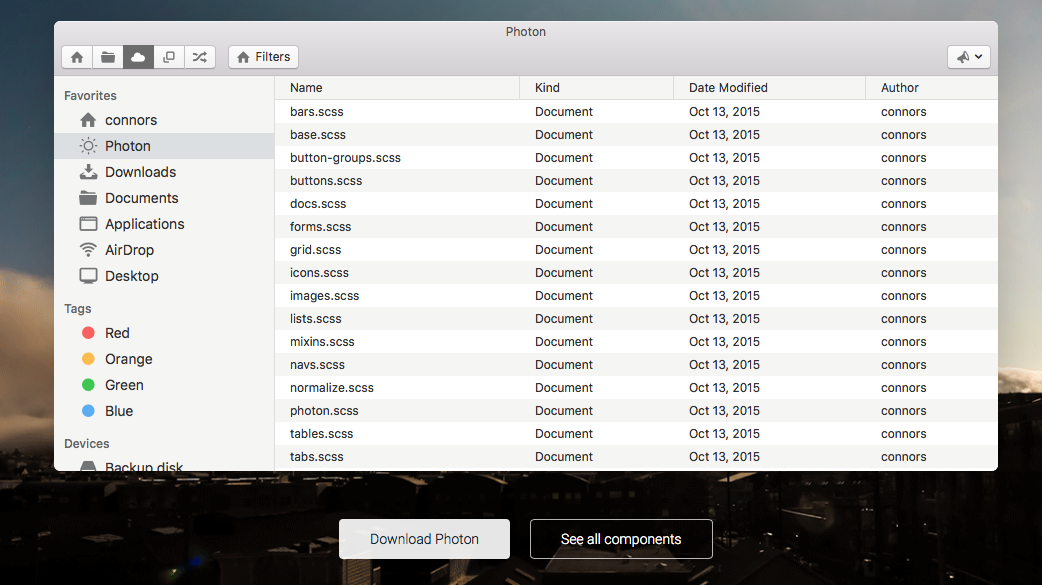
The fastest way to build beautiful Electron apps using simple HTML and CSS. .It's UI toolkit for building desktop apps with Electron. photonkit


6. MUI


MUI also follows the guidelines of Google’s Material Design. What is special about this one is that it is also available as a REACT, Angular, WebComponents or HTML Email framework. Muicss

7. Semantic UI


Semantic empowers designers and developers by creating a shared vocabulary for UI. Almost any component is pre built in this framework this one of the most powerful framework .Components can be used or developed . Semantic-ui

8. UIkit


UIkit is a light-weight and modular frontend framework that lets you develop fast and powerful web interfaces. It includes over 30 modular and extendible components, which can be combined with each other. UIkit also comes with a ‘customizer’, which allows you to create your own style for each component easily.  Uikit

9. Bootflat


Bootflat is an open source flat UI kit based on Twitter Bootstrap that lets you create web apps rapidly and easily. BootFlat ->

10 .Pure


PURE is created by Yahoo. It’s a lightweight framework with only very basic elements. It is divided into “Base”, “Grid”, “Forms”, “Buttons”, “Tables” and “Menus”. You can use all of these pacakges or just load the ones you need in your application. Pure

Store documents and media files in MySQL and php


Abstract

 A PHP script can be used with a HTML form to allow users to upload files to the server. Initially files are uploaded and stored into MySQL database  by a PHP script.This tutorial is an attempt to show you  how to store binary files in MySQL using BOLB .

1.What is BOLB ?!

BLOB (Binary Large Object) is a large object data type in the database system. BLOB could store a large chunk of data, document types and even media files like audio or video files. BLOB fields allocate space only whenever the content in the field is utilized. BLOB allocates spaces in Giga Bytes.

  • USAGE OF BLOB :

You can write a binary large object (BLOB) to a database as either binary or character data, depending on the type of field at your data source. To write a BLOB value to your database, issue the appropriate INSERT or UPDATE statement and pass the BLOB value as an input parameter. If your BLOB is stored as text, such as a SQL Server text field, you can pass the BLOB as a string parameter. If the BLOB is stored in binary format, such as a SQL Server image field, you can pass an array of type byte as a binary parameter.

2. BOLB and MySQL

MySQL provides a BLOB type that can hold a large amount of data. BLOB stands for the binary large data object. The maximum value of a BLOB object is specified by the available memory and the communication package size. You can change the communication package size by using the max_allowed_packet variable in MySQL and post_max_size in the PHP settings.

3.Files

In your /www folder of wamp/Lamp server create this files to start the project 


  • Config.php : set the globle variables of our application
  • index.php: this is the main page where the upload form was created 
  • insert.php: link to the database and insert files 
  • download.php: fetch data from the database and force files to be downloaded .
  • show.php: list all files in the database 

4.Create the Database

Database name: mystore
Table name: file_upload

CREATE TABLE IF NOT EXISTS `file_upload` (
  `file_id` int(11) NOT NULL AUTO_INCREMENT,
  `name` text NOT NULL,
  `mime` text NOT NULL,
  `size` text NOT NULL,
  `data` blob NOT NULL,
  `ext` text NOT NULL,
  `date` timestamp NOT NULL DEFAULT CURRENT_TIMESTAMP ON UPDATE CURRENT_TIMESTAMP,
  PRIMARY KEY (`file_id`)
) ENGINE=InnoDB DEFAULT CHARSET=latin1 AUTO_INCREMENT=1 ;


5. config.php

<?php
define("host","_HOST_");
define("username","_USERNAME_");
define("password","_PASSOWRD_");
define("db","_DBname_");
?>

6. index.php


<!--
This application developed by ibsSOFT @NODEME blog
visit http://nodeme.blogspot.com
@ihebBenSalem
-->
<!DOCTYPE html>
<html lang="EN">
 <head>
  <meta charset="utf-8">
  <meta http-equiv="X-UA-Compatible" content="IE=edge">
  <meta name="viewport" content="width=device-width, initial-scale=1">
  <title>Upload</title>

  <!-- Bootstrap CSS -->
  <link href="//netdna.bootstrapcdn.com/bootstrap/3.3.4/css/bootstrap.min.css" rel="stylesheet">

  <!-- HTML5 Shim and Respond.js IE8 support of HTML5 elements and media queries -->
  <!-- WARNING: Respond.js doesn't work if you view the page via file:// -->
  <!--[if lt IE 9]>
   <script src="https://oss.maxcdn.com/libs/html5shiv/3.7.0/html5shiv.js"></script>
   <script src="https://oss.maxcdn.com/libs/respond.js/1.4.2/respond.min.js"></script>
  <![endif]-->
 </head>
 <body>

<center>


<form action="insert.php" method="POST" role="form" enctype = "multipart/form-data">
 <legend>Upload files</legend>

<label class="btn btn-default btn-file">
    Browse <input type="file" name="myfile">
</label>

 <button type="submit" class="btn btn-danger">Upload</button>
</form><br>
<a href="show.php">Show upload file list</a>
</center>

  <!-- jQuery -->
  <script src="//code.jquery.com/jquery.js"></script>
  <!-- Bootstrap JavaScript -->
  <script src="//netdna.bootstrapcdn.com/bootstrap/3.3.4/js/bootstrap.min.js"></script>
 </body>
</html>

7. insert.php


<?php
/*
This application developed by ibsSOFT @NODEME blog
visit http://nodeme.blogspot.com
@ihebBenSalem
*/
require("config.php");
if (isset($_FILES["myfile"])) {
$error=$_FILES["myfile"]["error"];

if ($error ==0) {
 # code...
 $db_link=mysqli_connect(host,username,password,db) or die("Can not connect to db !");

     if (mysqli_connect_errno()) {
     echo "Failed to connect to MySQL: " . mysqli_connect_error();
     }

}

$name = mysqli_real_escape_string($db_link,$_FILES['myfile']['name']);
$extension = strtolower(substr($name, strpos($name, '.') + 1));
$tmp_name = mysqli_real_escape_string($db_link,$_FILES['myfile']['tmp_name']);
$type = mysqli_real_escape_string($db_link,$_FILES['myfile']['type']);
$size = mysqli_real_escape_string($db_link,$_FILES['myfile']['size']);
$data=mysqli_real_escape_string($db_link,file_get_contents($tmp_name));


$sql="INSERT INTO file_upload (name,mime, size,ext,data) VALUES ('$name','$type','$size','$extension','$data')";

if (!mysqli_query($db_link,$sql)) {
  die('Error: ' . mysqli_error($con));
}
else
{
header("location:show.php");
}
}
?>

8. download.php

<?php
/*
This application developed by ibsSOFT @NODEME blog
visit http://nodeme.blogspot.com
@ihebBenSalem
*/
require("config.php");
if (isset($_GET["id"]) and !empty($_GET["id"])) {
 # code...
$id=$_GET["id"];
if ($id<=0) { //check the id is valid
 # code...
 die("Error in id ! try again");
}
  $con=new mysqli(host,username,password,db) or die(" Can not connect to db ! ");
  $result=$con->query(" SELECT file_id,  `mime` ,  `name` ,  `size` ,  `data` FROM  `file_upload` WHERE  `file_id` ='$id'  ");


   if($result) {
            // Make sure the result is valid
            if($result->num_rows == 1) {
            // Get the row
                $row = mysqli_fetch_assoc($result);
 
                // Print headers
                header("Content-Type: ". $row['mime']);
                header("Content-Length: ". $row['size']);
                header("Content-Disposition: attachment; filename=". $row['name']);
 
                // Print data
                ob_clean();
                flush();
                echo $row['data'];
            }
        }
}
?>

9. show.php


<?php
/*
This application developed by ibsSOFT @NODEME blog
visit http://nodeme.blogspot.com
@ihebBenSalem
*/
require("config.php"); 
$con=new mysqli(host,username,password,db);
     if (mysqli_connect_errno()) {
     echo "Failed to connect to MySQL: " . mysqli_connect_error();
     }
     $qy=$con->query(" SELECT * FROM `file_upload` order by date DESC;");
?>

<!DOCTYPE html>
<html lang="EN">
 <head>
  <meta charset="utf-8">
  <meta http-equiv="X-UA-Compatible" content="IE=edge">
  <meta name="viewport" content="width=device-width, initial-scale=1">
  <title>Show</title>

  <!-- Bootstrap CSS -->
  <link href="//netdna.bootstrapcdn.com/bootstrap/3.3.4/css/bootstrap.min.css" rel="stylesheet">

  <!-- HTML5 Shim and Respond.js IE8 support of HTML5 elements and media queries -->
  <!-- WARNING: Respond.js doesn't work if you view the page via file:// -->
  <!--[if lt IE 9]>
   <script src="https://oss.maxcdn.com/libs/html5shiv/3.7.0/html5shiv.js"></script>
   <script src="https://oss.maxcdn.com/libs/respond.js/1.4.2/respond.min.js"></script>
  <![endif]-->
 </head>
 <body>
<div class="well well-lg"><center><h3> Files List</h3></center> </div>
<a class="btn btn-default btn-block" href="index.php" role="button">Upload more files</a>

<table class="table table-hover">
 <thead>
  <tr>
   <th>#id</th>
   <th>#Name</th>
   <th>#Mime</th>
   <th>#size
</th>
   <th>#Extension</th>
   <th>#Download</th>
   <th>#Date</th>
  </tr>
 </thead>
 <tbody>

<?php
$counter=0;
while ($rs=$qy->fetch_array()) {
 # code...
 $counter++;
 echo '<tr>
 <td>'.$counter.'</td>
 <td>'.$rs[1].'</td>
 <td>'.$rs[2].'</td>
 <td>'.$rs[3].'</td>
 <td>'.$rs[5].'</td>
 <td>'.$rs[6].'</td>
 <td><a href="download.php?id='.$rs[0].'">Download</a>
 </td>
 </tr>';
}

?> 
 </tbody>
</table>

  <!-- jQuery -->
  <script src="//code.jquery.com/jquery.js"></script>
  <!-- Bootstrap JavaScript -->
  <script src="//netdna.bootstrapcdn.com/bootstrap/3.3.4/js/bootstrap.min.js"></script>
 </body>
</html>

10.Configure apache

By trying to upload huge files such as 1 G0 or even files in Mo this application, we'll not work well because by default the size supported by mysql server is limited to 16 M0 for allowing packet, and 16 M0 for max file size, so, obviously we need to change this configuration to upload files with big size.
open up your Terminal and let's go :D:

nano /etc/my.cnf 


and now :

add the line: max_allowed_packet=256M (obviously adjust size for whatever you need) 
under the [MYSQLD] section. He made a mistake of putting it at the bottom of the
file first so it did not work.
 
Press Ctrl+x  then Y to save the conf .
Now let's update the apache upload size :


sudo nano /etc/php5/apache2/php.ini
which will show you the actual maximum file size .change the 

upload_max_filesize 2M 2M
to 500M for exemple

Now Restart apache and mysql server

sudo service apache2 restart

sudo service mysql restart

11.Screenshots of the project


12.Download the project


Download the project from Github :bolb-in-php-and-mysql


Write your own PHP MVC Framework [part 1]


Abstract

This article shows you how to start writing your own php mvc framework ,from the basic architecture to an advanced approach to build more module in your framework.Am sharing with you this method ,in the hope that it will be useful.
"Unless you try to do something beyond what you have already mastered, you will never grow.                                                                                                         -Waldo Emerson

1.What is MVC ?!         

MVC is a software architecture - the structure of the system - that separates domain/application/business (whatever you prefer) logic from the rest of the user interface. It does this by separating the application into three parts: the model, the view, and the controller. 

  •  The model manages fundamental behaviors and data of the application. It can respond to requests for information, respond to instructions to change the state of its information, and even to notify observers in event-driven systems when information changes. This could be a database, or any number of data structures or storage systems. In short, it is the data and data-management of the application. 
  •  The view effectively provides the user interface element of the application. It'll render data from the model into a form that is suitable for the user interface. 
  •  The controller receives user input and makes calls to model objects and the view to perform appropriate actions. All in all, these three components work together to create the three basic components of MVC.
For more information visit this link :introduction to the mvc_framework

2.Architecture

The architecture is a combination of a front controller on the server and model-view-controller design pattern and a directory structure ,that makes adding features in a self contained modular way easy. We will delve into each of these core architectural components in turn below.
Directory structure


3.Configure Apache


sudo a2enmod rewrite

For and change AllowOverride None to AllowOverride All. This may be on lines 7 and 11 of /etc/apache2/sites-available/default. Modern versions of Ubuntu store these in the main config file: /etc/apache2/apache2.conf.

sudo nano /etc/apache2/apache2.conf

Now restart your apache server :

sudo service apache2 restart


4.The front controller: index.php

The first key point is that all site traffic is directed through index.php. This is a common design pattern called the front controller which allows us to load components used by the whole application such as user sessions and database connection in one place. We use mod_rewrite to make the URL look clean, converting:
myframework/user/login
to:
myframework/index.php?q=user/login

index.php then fetches the property q with $_GET['q']. using q as a command to tell the application what to do.


5.Build it


Start by creating a folder in your LAMP server /var/www directory lets call it framework Create a new file called .htaccess and open it in your favourite code editor, copy and paste the following code into the .htaccess file:
 .htaccess:


# Don't show directory listings for URLs which map to a directory.
Options -Indexes

# Set the default handler.
DirectoryIndex index.php

# Various rewrite rules.

  RewriteEngine on
  # Rewrite URLs of the form 'x' to the form 'index.php?q=x'.
  RewriteCond %{REQUEST_FILENAME} !-f
  RewriteCond %{REQUEST_FILENAME} !-d
  RewriteCond %{REQUEST_URI} !=/favicon.ico
  RewriteRule ^(.*)$ index.php?q=$1 [L,QSA]


This script tells Apache that whenever a HTTP request arrives and if no physical file (!-f) or path (!-d) or symbolic link (!-l) can be found, it should transfer control to index.php, which is the front controller. Next create a new file called index.php, to illustrate what the .htaccess file does add the following two lines to index.php.

<?php

echo "q=".$_GET['q'];
?>
Next: navigate to http://localhost/framework/stories/list.json in your browser and you should see the following:
q=stories/list.json

As you can see the stories/list.json part has been passed to index.php as a string rather than navigating to an actual folder and file location.

1) Decoding the route

Next we want to decode the "stories/list.json" so that we can use it in our application, in this example: 


  • stories is the controller (the module we want to use) 
  • list is the action 
  • json is the format

Copy and paste the following into index.php:

<?php

require "route.php";
$route = new Route($_GET['q']);

echo "The requested controller is: ".$route->controller."<br>";
echo "The requested action is: ".$route->action."<br>";
echo "The requested format is: ".$route->format."<br>";


and create a file called route.php with the following:

<?php

class Route
{
    public $controller = '';
    public $action = '';
    public $subaction = '';
    public $format = "html"; 

    public function __construct($q)
    {
        $this->decode($q);
    }

    public function decode($q)
    {
        // filter out all except a-z and / .
        $q = preg_replace('/[^.\/A-Za-z0-9]/', '', $q);

        // Split by /
        $args = preg_split('/[\/]/', $q);

        // get format (part of last argument after . i.e view.json)
        $lastarg = sizeof($args) - 1;
        $lastarg_split = preg_split('/[.]/', $args[$lastarg]);
        if (count($lastarg_split) > 1) { $this->format = $lastarg_split[1]; }
        $args[$lastarg] = $lastarg_split[0];

        if (count($args) > 0) { $this->controller = $args[0]; }
        if (count($args) > 1) { $this->action = $args[1]; }
        if (count($args) > 2) { $this->subaction = $args[2]; }
    }
}


Navigate again to http://localhost/framework/stories/list.json in your browser and you should see the following:

The requested controller is: stories
The requested action is: list
The requested format is: json


For more information visit this documentation  of the community  src:_Link_
note:this framework have inspired me to build my own framework .
@emoncms